Cisco Nexus 5500 enhanced vPC
Cisco Nexus 5500 enhanced vPC
In dieser Anleitung möchte ich auf die Cisco Nexus 5500 enhanced vPC Konfiguration des Switches eingehen.
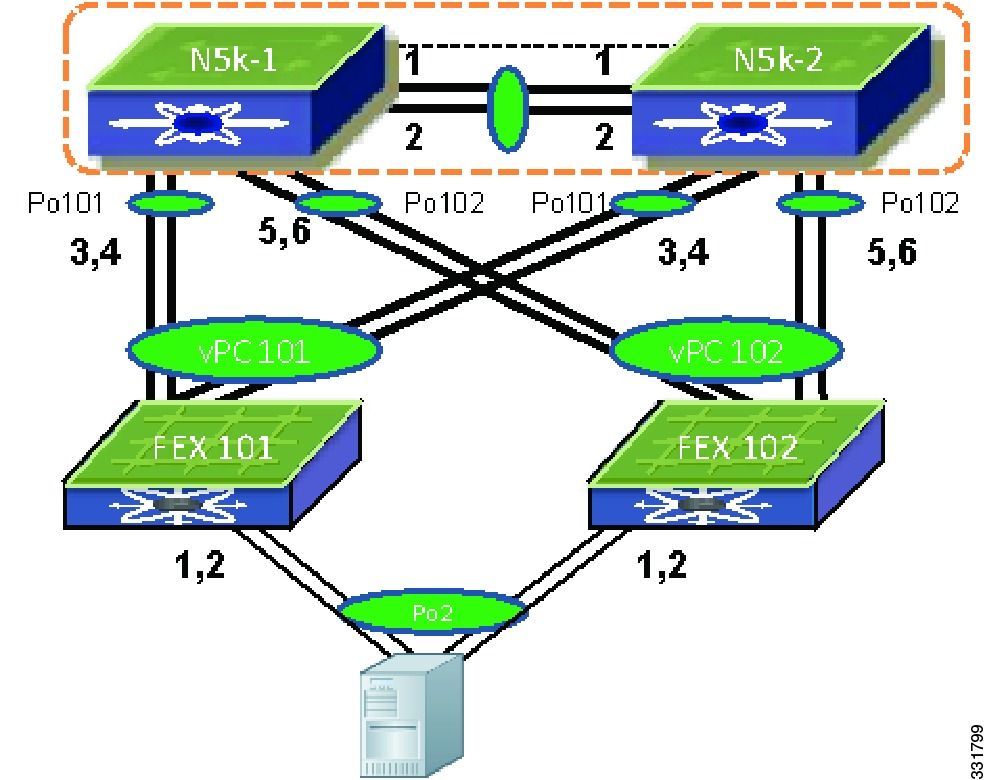
In diesem Szenario verwendete Switches:
Cisco Nexus 5000er:
N5K-1 = IP 192.168.0.10
N5K-2 = IP 192.168.0.11
Grundkonfiguration für das Management Interface
Diese Einstellungen sollten eigentlich schon beim Initialen Setup des Switches gemacht worden sein aber zur Sicherheit sollte man das nochmal durchgehen.
N5K-1
configure
switchname N5K-1
interface mgmt0
    ip address 192.168.0.10 255.255.255.0
    no shutdown
    vrf member management
exit

feature ntp

vrf context management
    ip domain-name domain.tld
    ip name-server 8.8.8.8 8.8.4.4
    ip route 0.0.0.0/0 192.168.0.1
exit

no telnet server enable
clock timezone UTC 1 0
clock format 24-hours
clock summer-time EDT 2 Sunday March 02:00 1 Sundy November 02:00 60
ntp distribute
ntp server 0.debian.pool.ntp.org prefer use-vrf management
ntp commit

end
N5K-2
configure
switchname N5K-1
interface mgmt0
    ip address 192.168.0.10 255.255.255.0
    no shutdown
    vrf member management
exit

feature ntp

vrf context management
    ip domain-name domain.tld
    ip name-server 8.8.8.8 8.8.4.4
    ip route 0.0.0.0/0 192.168.0.1
exit

no telnet server enable
clock timezone UTC 1 0
clock format 24-hours
clock summer-time EDT 2 Sunday March 02:00 1 Sundy November 02:00 60
ntp distribute
ntp server 0.debian.pool.ntp.org prefer use-vrf management
ntp commit

end
Grundkonfiguration für den vPC
Auf dem N5K-1 und dem N5K-2 die Features VPC, LACP und FEX aktivieren.
configure
feature vpc
feature lacp
feature fex

end
Auf beiden Switches den vPC peer-link Konfigurieren.
Das Peer-Keepalive sollte immer über das Management Interface geschallten werden.
N5K-1
configure
vpc domain 2
    peer-keepalive destination 192.168.0.11 source 192.168.0.10 vrf management
    peer-gateway
    peer-switch
    ip arp synchronize
    delay restore 120
    graceful consistency-check
    auto-recovery
    auto-recovery reload-delay 240

interface Ethernet1/1-2
    description vpc peer-link
    channel-group 1 mode active

interface port-channel1
    description vpc peer-link
    vpc peer-link
    switchport mode trunk
    spanning-tree port type network

end
N5K-2
configure
vpc domain 2
    peer-keepalive destination 192.168.0.10 source 192.168.0.11 vrf management
    peer-gateway
    peer-switch
    ip arp synchronize
    delay restore 120
    graceful consistency-check
    auto-recovery
    auto-recovery reload-delay 240

interface Ethernet1/1-2
    description vpc peer-link
    channel-group 1 mode active

interface port-channel1
    description vpc peer-link
    vpc peer-link
    switchport mode trunk
    spanning-tree port type network

end
Grundkonfiguration für den Config Sync
N5K-1
configure
cfs ipv4 mcast-address 192.168.0.1
y
cfs ipv4 distribute

config sync
switch-profile sync
    sync-peers destination 192.168.0.11
    commit

end

show cfs status
show switch-profile peer
N5K-2
configure
cfs ipv4 mcast-address 192.168.0.1
y
cfs ipv4 distribute

config sync
switch-profile sync
    sync-peers destination 192.168.0.10
    commit

end

show cfs status
show switch-profile peer
Grundkonfiguration für die FEX
Hier sollte man darauf achten das man die FEX Ports gleich mit einem pre-provision versieht. So kann man die Ports schon konfigurieren auch wenn der FEX Switch noch Offline ist.
configure
fex 101
    description "FEX 101 N2K-C2248T-1GE"
    pinning max-links 1

slot 101
    provision model N2K-C2248T

fex 102
    description "FEX 102 N2K-C2232PP-10GE"
    pinning max-links 1

slot 102
    provision model N2K-C2232P

interface port-channel 101
    description "FEX 101 N2K-C2248T-1GE"
    switchport mode fex-fabric
    fex associate 101
    vpc 101
    no shutdown

interface port-channel 102
    description "FEX 102 N2K-C2232PP-10GE"
    switchport mode fex-fabric
    fex associate 102
    vpc 102
    no shutdown

interface Ethernet1/3-4
    description "FEX 101 N2K-C2248T-1GE"
    switchport mode fex-fabric
    fex associate 101
    channel-group 101
    no shutdown

interface Ethernet1/5-6
    description "FEX 102 N2K-C2232PP-10GE"
    switchport mode fex-fabric
    fex associate 102
    channel-group 102
    no shutdown

end
Erstklassig erklärt Herr Preußner. Respekt.